

Identity Federation for Automated Workflows
Identity Federation allows you to authenticate to Border0 using trusted external identity providers (IdPs) without managing long-lived credentials. This is particularly useful for CI/CD pipelines, GitHub Actions, and other automated workflows.
Overview
Identity Federation enables:
- Password-less Authentication: No need to store or rotate long-lived tokens
- Impersonating a Service Account: Temporary credentials are for a single Border0 service account and carry the same level of permissions as any long-lived credential for that service account
- Border0 Policy and Auditing: All sessions for federated identities are recorded and subject to Border0 policies, like any human or non-human in your organization
- OIDC Issuer Agnostic: Federation works for explicit services e.g. GitHub, GitLab, CircleCI, and AWS, but also for any generic OIDC issuer.
How It Works
- Configure Federation Rules: Define which OIDC issuers and subjects can authenticate to your service account
- Obtain OIDC Token: Your CI/CD platform (e.g., GitHub Actions) obtains an OIDC token from its identity provider
- Exchange Token: The OIDC token is exchanged for a short-lived Border0 token via the Border0 API
- Use Border0 Token: The Border0 token can be used to authenticate to Border0 services
┌─────────────────┐
│  GitHub Actions │
│   (or CI/CD)    │
└────────┬────────┘
         │
         │ 1. Request OIDC token
         ▼
┌─────────────────┐
│  GitHub IdP     │
│  (OIDC Issuer)  │
└────────┬────────┘
         │
         │ 2. Return OIDC token
         ▼
┌─────────────────┐
│  Border0 API    │
│  /auth/web_     │
│  identity/      │
│  exchange       │
└────────┬────────┘
         │
         │ 3. Validate & Exchange
         │    - Verify token signature
         │    - Check issuer/subject
         │    - Match federation rules
         │
         ▼
┌─────────────────┐
│  Border0 Token  │
│  (short-lived)  │
└─────────────────┘
Setting Up Identity Federation
Identity Federation for a given Service Account is managed through Identity Federation Rules.
A rule consists of an issuer URL and a set of allowed subject patterns. For example, the rule:
- Issuer:
https://token.actions.githubusercontent.com - Patterns:
repo:adrianosela/border0-demo:*repo:borderzero/examples:ref:refs/heads/main
Allows workflows with GitHub Action issued tokens matching the subjects (sub JWT claim) above.
You may set-up such a rule by navigating to the Border0 Admin Portal Team > Service Accounts > Click on a Service Account to view details > Click the "+ Add Federation Rule".
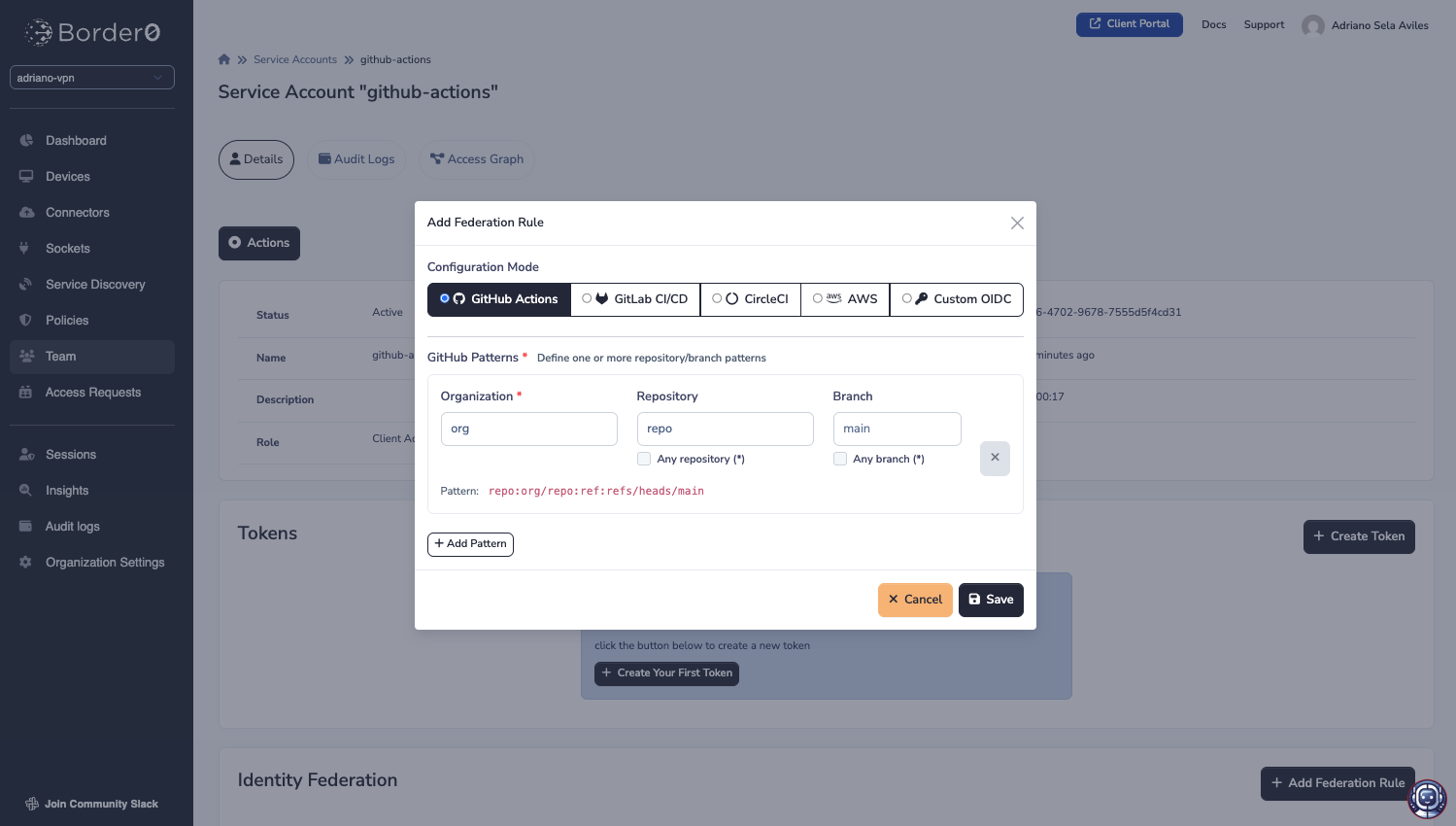
Note that while there are specifically handled issuers such as GitHub Actions, GitLab CI/CD, CircleCI, and AWS, you may also add a rule for a custom OIDC issuer:
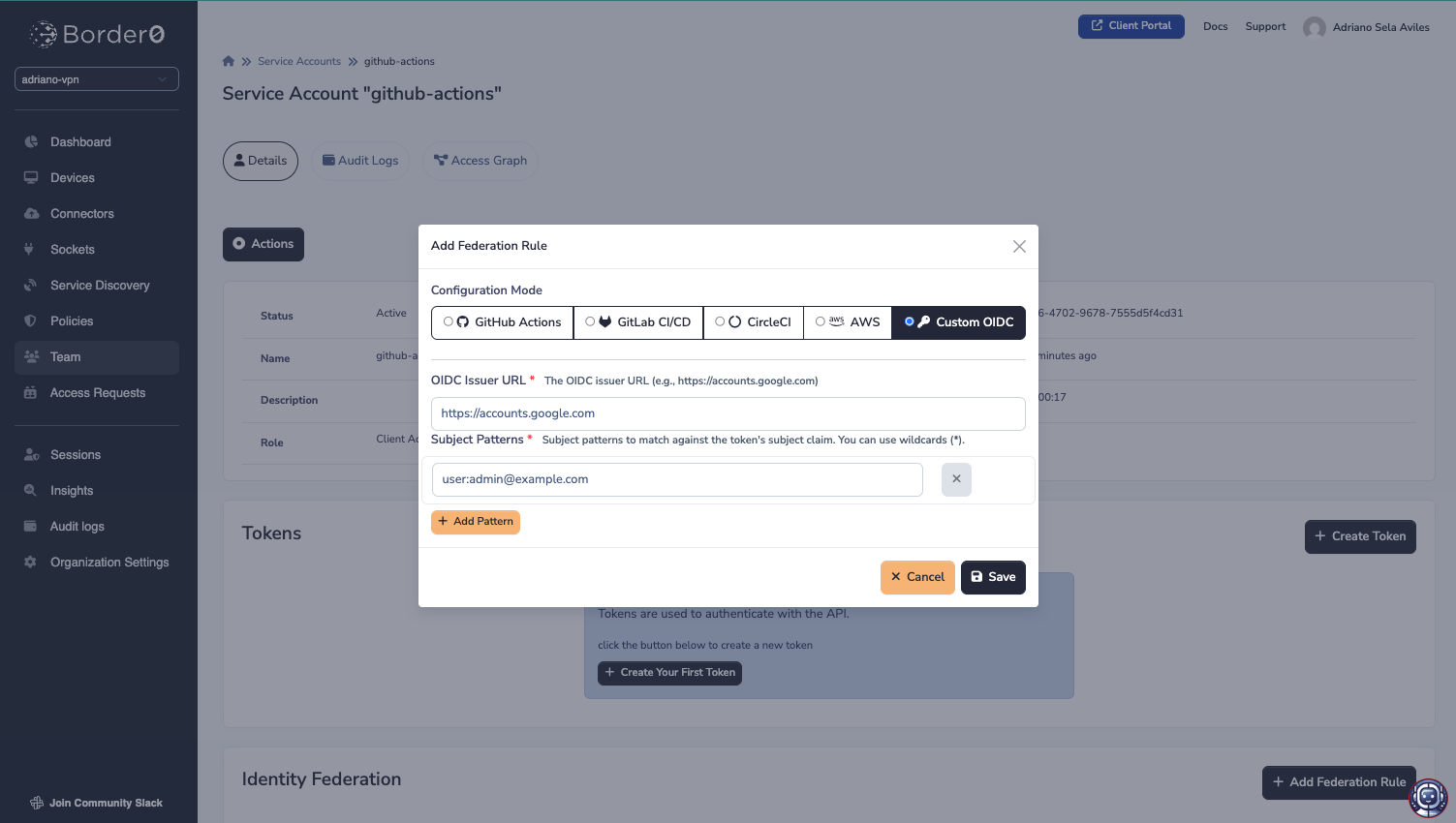
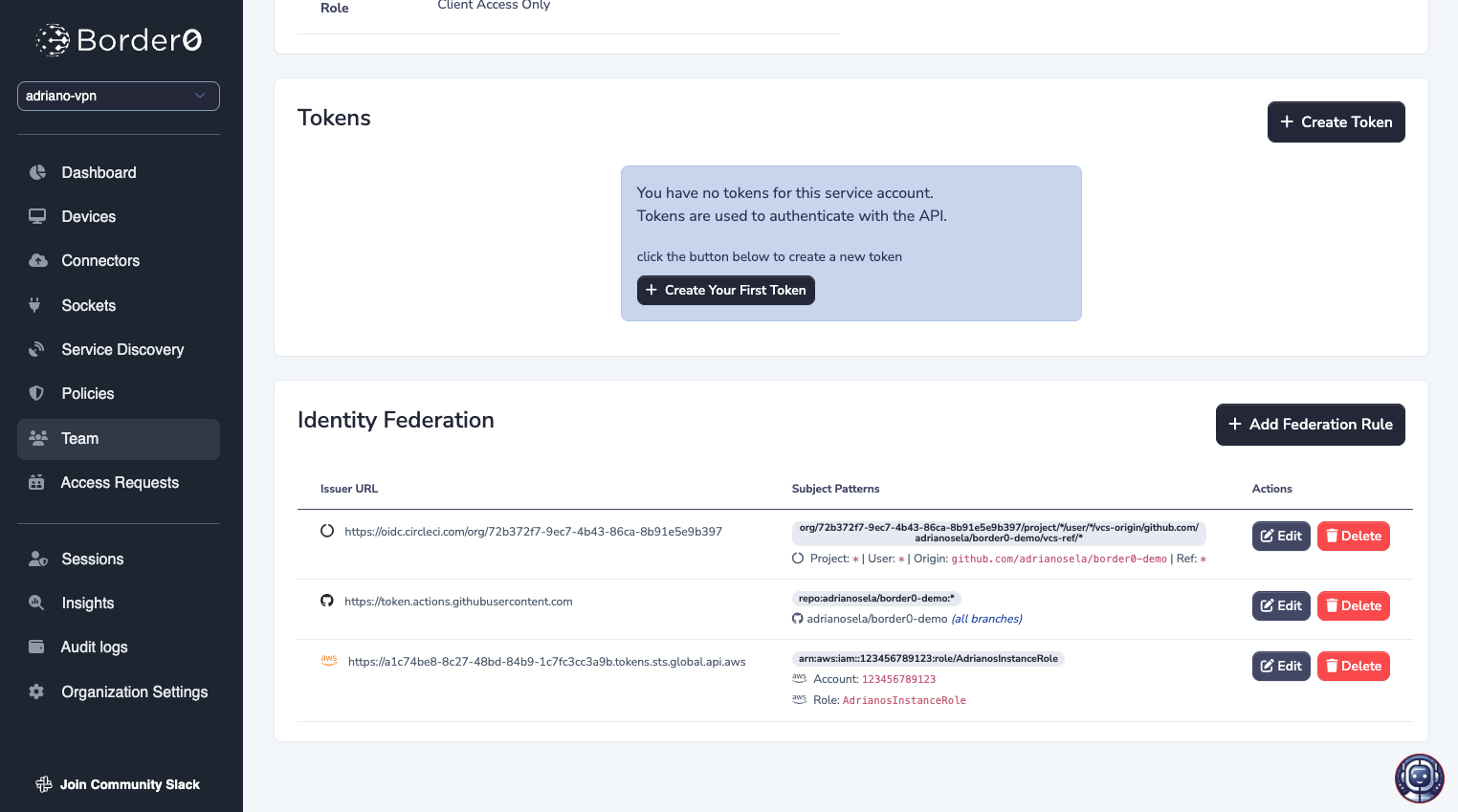
Once you save the rules, you should see it in the Identity Federation table at the bottom of the page.
You can have multiple rules, for different providers, each with potentially multiple patterns, all for the same service account:
Exchanging OIDC Tokens for Border0 Tokens
Token Requirements
To exchange an OIDC token from a third-party issuer, the OIDC token must:
- Have audience (
aud) set to stringapi.border0.com(or if array, include the stringapi.border0.com) - Be signed by the issuer using RS256, RS384, RS512, or EdDSA
- Include a valid issuer (
iss) claim - Include a subject (
sub) claim that matches a federation rule pattern - Not be expired
API Endpoint
For a workflow to exchange its service provider token for a Border0 service account token, they must hit the following API endpoint:
POST /api/v1/auth/web_identity/exchangeWith the following request body:
{
  "organization_subdomain": "myorg",
  "service_account_name": "github-actions",
  "web_identity_token": "eyJhbGciOiJSUzI1NiIsInR5cCI6IkpXVCJ9...",
  "border0_token_duration_seconds": 3600
}
Parameters:
organization_subdomain(required): Your Border0 organization subdomainservice_account_name(required): The service account nameweb_identity_token(required): The OIDC token from your identity providerborder0_token_duration_seconds(optional): Token expiration (default: 900, max: 43200)border0_token_name_prefix(optional): Prefix for the generated token name (max 25 chars)
Response:
The response will contain a single token field with your workflow's short-lived Border0 token.
{
  "token": "eyJhbGciOiJIUzI1NiIsInR5cCI6IkpXVCJ9..."
}
GitHub Actions Integration
Border0 provides two GitHub Actions for seamless integration:
configure-border0-credentials
Exchanges GitHub's OIDC token for Border0 credentials.
name: Example Workflow
on: workflow_dispatch

permissions:
  id-token: write  # Required for OIDC token
  contents: read

jobs:
  example:
    runs-on: ubuntu-latest
    steps:
      - name: Configure Border0 Credentials
        id: border0
        uses: borderzero/[email protected]
        with:
          border0-org-subdomain: myorg
          border0-svc-account-name: github-actions
          border0-token-duration-seconds: 3600

      - name: Use Border0 Token
        run: |
          echo "Token obtained successfully"
          border0 socket ls
        env:
          BORDER0_TOKEN: ${{ steps.border0.outputs.token }}
Inputs:
border0-org-subdomain(required): Your Border0 organization subdomainborder0-svc-account-name(required): Service account name with federation rulesborder0-token-duration-seconds(optional): Token duration in seconds (default: 3600)border0-api-url(optional): Border0 API base URL
Outputs:
token: The Border0 authentication token
configure-border0-network
Installs Border0 and starts a VPN node using identity federation.
name: Access Private Resources
on: workflow_dispatch

permissions:
  id-token: write
  contents: read

jobs:
  deploy:
    runs-on: ubuntu-latest
    steps:
      - uses: actions/checkout@v4

      - name: Start Border0 VPN
        id: border0-vpn
        uses: borderzero/[email protected]
        with:
          border0-org-subdomain: myorg
          border0-svc-account-name: github-actions
          border0-token-duration-seconds: 900

      - name: Access Private Database
        run: |
          # Now you can access resources over Border0 network
          psql -h private-db-border0-internal -U myuser -d mydb

      - name: Stop Border0 VPN
        if: always()
        run: bash ${{ steps.border0-vpn.outputs.cleanup-script }}
Inputs:
border0-org-subdomain(required): Border0 organization subdomainborder0-svc-account-name(required): Service account nameborder0-token-duration-seconds(optional): Token duration (default: 3600)vpn-wait-seconds(optional): Seconds to wait for VPN connection (default: 5)debug(optional): Enable debug output (default: false)
Alternatively, use with a pre-existing token:
- name: Start Border0 VPN
  id: border0-vpn
  uses: borderzero/[email protected]
  with:
    border0-token: ${{ secrets.BORDER0_TOKEN }}
Security Considerations
Subject Pattern Wildcards
Subject patterns support wildcard matching using *:
*matches any sequence of characters within a single segment- Use specific patterns when possible to minimize access
Examples:
repo:myorg/*:*- Broad: All repos in myorgrepo:myorg/myrepo:*- Better: Specific reporepo:myorg/myrepo:ref:refs/heads/main- Best: Specific branch
Token Duration
- Minimum Duration: 1 second
- Maximum Duration: 43,200 seconds (12 hours)
- Default Duration: 900 seconds (15 minutes)
- Recommendation: Use the shortest duration that meets your needs
Troubleshooting
"Token signature verification failed"
Cause: The OIDC token's signature could not be verified.
Solutions:
- Ensure the issuer's OIDC configuration is accessible at
{issuer}/.well-known/openid-configuration - Verify the token hasn't been modified
- Check that the issuer uses a supported signing algorithm (RS256, RS384, RS512, EdDSA)
"Token audience not allowed"
Cause: The OIDC token's aud claim doesn't match the required audience.
Solutions:
- Ensure your IdP is configured to issue tokens with audience
api.border0.com - In GitHub Actions: Use
core.getIDToken("api.border0.com")to request a token with the correct audience - In CircleCI: Use
circleci run oidc get --claims "{\"aud\":\"api.border0.com\"}"
"Token subject not allowed"
Cause: The token's subject doesn't match any configured federation rule patterns.
Solutions:
- Review your federation rules
- Check the subject claim in your OIDC token
- Update subject patterns to include the actual subject
"Service account has no applicable federation rules"
Cause: No federation rules are configured for the issuer.
Solutions:
- Add a federation rule for your issuer
- Verify the issuer URL exactly matches (including https://)
"Requested token duration exceeds maximum"
Cause: Token duration requested exceeds 43,200 seconds (12 hours).
Solutions:
- Reduce
border0_token_duration_secondsto 43,200 or less - Use multiple shorter-lived tokens instead of one long-lived token
Additional Resources
Updated 9 months ago